Master Ascending Order in SQL: The Ultimate Guide
When managing data in relational databases, the sequence in which information is presented can significantly impact analysis and reporting. Ascending order in SQL is the foundational method for organizing query results from the smallest to the largest, or alphabetically from A to Z. This systematic arrangement transforms raw data into actionable intelligence, making it easier for developers and analysts to identify patterns and trends.
Understanding the ORDER BY Clause
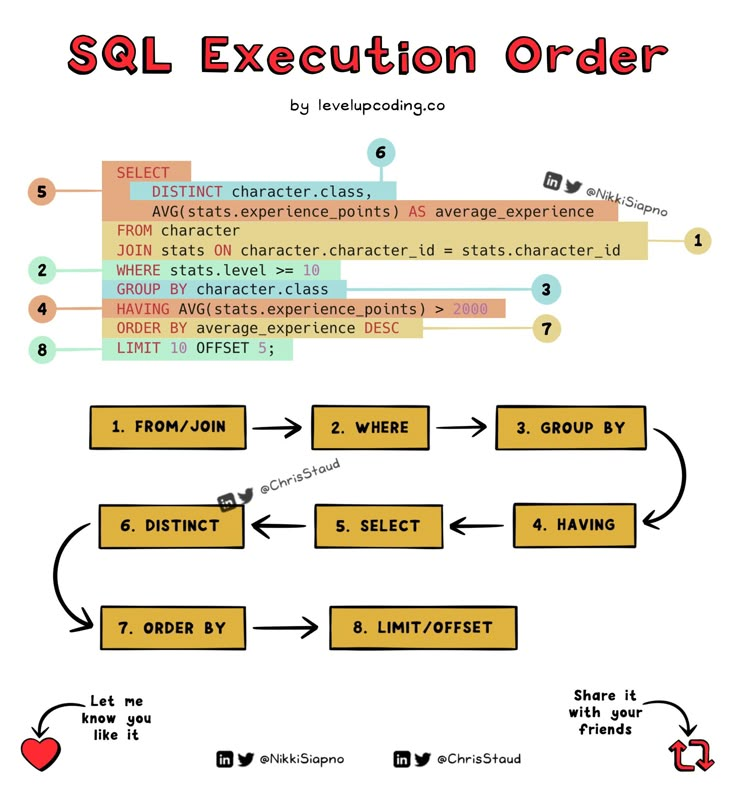
The engine behind this sorting mechanism is the ORDER BY clause. While SELECT retrieves data and WHERE filters it, ORDER BY dictates the presentation structure. By default, this clause arranges records in ascending order, handling numbers, text, and dates with logical precision. Without this clause, the database returns rows in an unpredictable sequence, often determined by physical storage rather than logical value.
Practical Implementation of Ascending Order
Implementing ascending order is straightforward, yet it requires an understanding of syntax nuances. The clause is always placed at the end of a query, just before limiting clauses. It establishes a reading flow that guides the user naturally through the dataset. This logical progression is essential for creating dashboards, generating reports, or simply verifying data integrity.


Sorting Numeric Data
For numerical columns, ascending order arranges values from the lowest to the highest. This is particularly useful for financial data, such as viewing transactions from the smallest purchase to the largest. It allows for easy identification of outliers or minimum thresholds without complex calculations.
Sorting Textual Data
When applied to string data, the ascending order follows lexicographical sequence based on the character set of the database. This means alphabetical sorting where uppercase letters typically precede lowercase. It is the standard method for organizing names, product codes, or geographical locations, ensuring a familiar and searchable format.


Managing Default Behavior
It is a common misconception that ascending order must be explicitly stated. In reality, ORDER BY column_name defaults to ascending if the DESC (descending) keyword is omitted. However, for clarity and maintainability of code, explicitly including ASC is considered a best practice. This ensures that the developer's intent is unambiguous to anyone reading the SQL statement.
Handling Null Values
One of the most critical aspects of sorting is how the database handles NULL values. Depending on the database management system, NULL—representing missing or undefined data—can be treated as the smallest possible value. Consequently, in an ascending sort, rows containing NULL often appear at the top of the result set. Understanding this behavior is vital to prevent logical errors in data interpretation.
Multi-Column Sorting Techniques
Advanced sorting allows for hierarchical organization through multi-column ORDER BY clauses. This is useful when primary sorting criteria result in ties. For instance, sorting employees first by department (ascending) and then by salary (ascending) creates a structured hierarchy. This technique ensures that data is layered logically, providing context that single-column sorts cannot achieve.


| Column | Sort Order | Result |
|---|---|---|
| Date | ASC | Oldest to Newest |
| Price | ASC | $1 to $1000 |
| Name | ASC | A to Z |
| Status | ASC | Draft → Published |




Related Articles

The Ultimate Guide to Hydroponic Water Treatment: Master Clean & Healthy Systems
Hydroponic water treatment is the backbone of any successful soilless cultivation system, serving as the critical process that ensures nutrient solutions are...

Master How to Write Last Name First: The Ultimate SEO Guide
Formatting names correctly is a detail that often goes overlooked, yet it plays a crucial role in professional communication, academic citations, and data...

The Ultimate Guide to Indigo Dye at Home: Master the Craft
Indigo dyeing at home transforms a simple weekend project into a profound connection with one of the world's most storied pigments. For centuries, this complex...

The Ultimate Pattern Guide Sheet Definition: Master Your Next Project
At its core, a pattern guide sheet definition refers to the standardized documentation that outlines the specifications, measurements, and construction details...

Master Spoken Word: The Ultimate Guide on How to Write Spoken Word Poetry
Spoken word is a living, breathing art form that exists in the space between intention and performance. It transforms solitary thoughts into shared experience...

The Ultimate BCE Pool Table Guide: Master the Game Tonight
The BCE pool table represents a fascinating intersection of engineering precision and recreational design, offering a unique experience for both casual players...